# A tibble: 4 × 2
# Groups: group [2]
group ados
<chr> <dbl>
1 ASD 15
2 ASD 17
3 TD NA
4 TD NA
PSTAT197A Fall 2026
UCSB
Make your final commits for the first group assignment by Friday 10/16 11:59pm PST
report.qmd and report.html with your write-upNext group assignment to be distributed this weekend.
introduced ASD proteomic dataset
used multiple testing corrections to identify proteins whose serum levels differ significantly between ASD/TD groups
discussed the difference between controlling familywise error vs. false discovery
We’ll talk about two more approaches to identifying proteins of interest:
correlation-based identification of proteins
random forest classifier
Autism Diagnostic Observation Schedule (ADOS) scores are determined by psychological assessment and measure ASD severity.
# A tibble: 4 × 2
# Groups: group [2]
group ados
<chr> <dbl>
1 ASD 15
2 ASD 17
3 TD NA
4 TD NA
ados is only measured for the ASD group
numerical score between 6 and 23 (at least in this sample)
So here’s an idea:
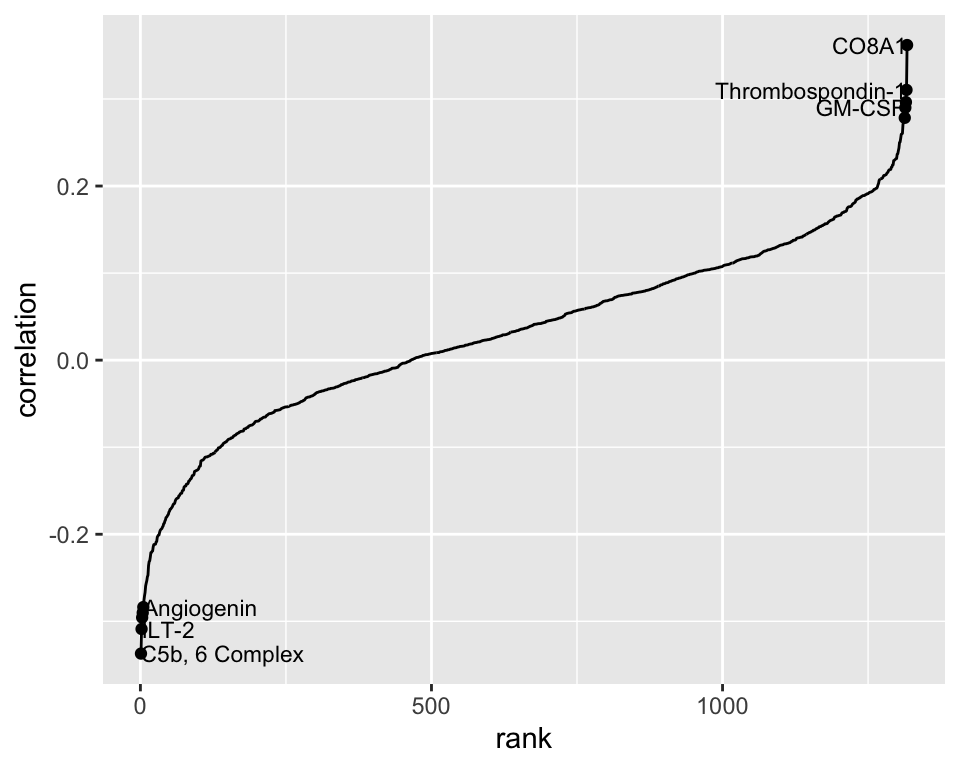
compute correlations of each protein with ADOS;
pick the 10 proteins with the strongest correlation
This is a simple aggregation operation and can be executed in R with summarize() :
# A tibble: 1,317 × 2
protein correlation
<chr> <dbl>
1 14-3-3 0.0970
2 14-3-3 protein beta/alpha 0.0481
3 14-3-3 protein theta 0.122
4 14-3-3 protein zeta/delta 0.0735
5 14-3-3E -0.127
6 17-beta-HSD 1 0.0969
7 3HAO 0.0773
8 3HIDH 0.0452
9 4-1BB 0.0290
10 4-1BB ligand 0.0799
# ℹ 1,307 more rows
# A tibble: 10 × 4
protein correlation abs.corr rank
<chr> <dbl> <dbl> <int>
1 CO8A1 0.362 0.362 1317
2 C5b, 6 Complex -0.337 0.337 1
3 Thrombospondin-1 0.310 0.310 1316
4 ILT-2 -0.309 0.309 2
5 TRAIL R4 0.296 0.296 1315
6 HCE000414 -0.296 0.296 3
7 C1r -0.290 0.290 4
8 GM-CSF 0.290 0.290 1314
9 Angiogenin -0.284 0.284 5
10 HCG 0.278 0.278 1313
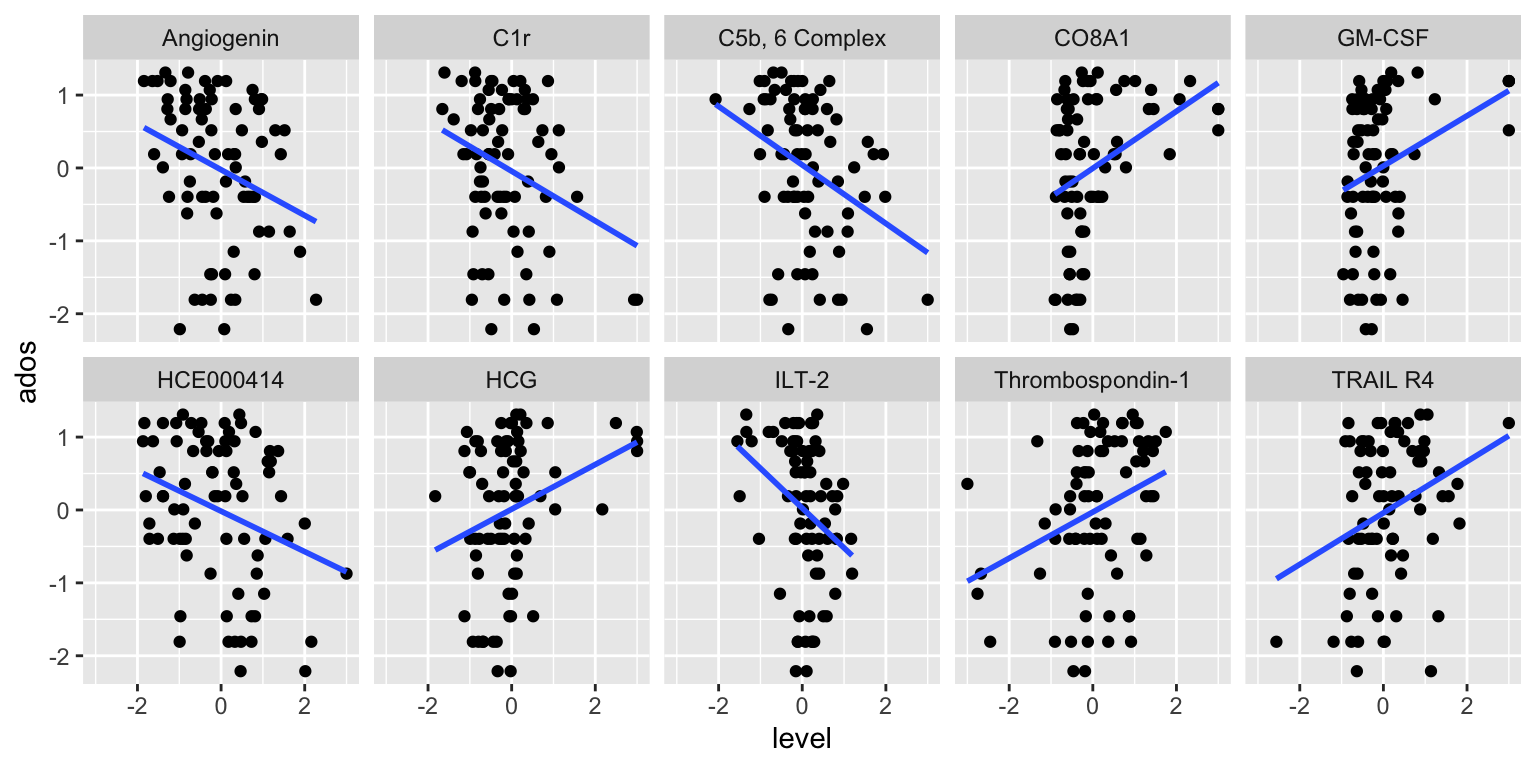
Fact: the simple linear regression coefficient estimate is proportional to the correlation coefficient.
So it should give similar results to sort the SLR coefficients by significance.
# A tibble: 1,317 × 3
protein estimate p.value
<chr> <dbl> <dbl>
1 CO8A1 0.391 0.00131
2 C5b, 6 Complex -0.401 0.00290
3 Thrombospondin-1 0.317 0.00635
4 ILT-2 -0.546 0.00664
5 TRAIL R4 0.353 0.00933
6 HCE000414 -0.278 0.00950
7 C1r -0.341 0.0110
8 GM-CSF 0.345 0.0110
9 Angiogenin -0.314 0.0130
10 HCG 0.306 0.0149
# ℹ 1,307 more rows
If we do the correlation analysis this way, do the identified proteins pass multiple testing significance thresholds?
# A tibble: 10 × 5
protein estimate p.value p.BH p.BY
<chr> <dbl> <dbl> <dbl> <dbl>
1 CO8A1 0.391 0.00131 0.990 1
2 C5b, 6 Complex -0.401 0.00290 0.990 1
3 Thrombospondin-1 0.317 0.00635 0.990 1
4 ILT-2 -0.546 0.00664 0.990 1
5 TRAIL R4 0.353 0.00933 0.990 1
6 HCE000414 -0.278 0.00950 0.990 1
7 C1r -0.341 0.0110 0.990 1
8 GM-CSF 0.345 0.0110 0.990 1
9 Angiogenin -0.314 0.0130 0.990 1
10 HCG 0.306 0.0149 0.990 1
probably just introducing selection noise
this result diverges considerably from the paper
The SLR approach is equivalent to sorting the correlations. (Take a moment to check the results.)
We could use inference on the population correlation to obtain a \(p\)-value associated with each sample correlation coefficient. These match the ones from SLR.
cor_test <- function(x, y){
cor_out <- cor.test(x, y)
tibble(estimate = cor_out$estimate,
p.value = cor_out$p.value)
}
asd_clean %>%
pivot_longer(cols = -ados,
names_to = 'protein',
values_to = 'level') %>%
group_by(protein) %>%
summarize(correlation = cor_test(ados, level)) %>%
unnest(correlation) %>%
arrange(p.value)# A tibble: 1,317 × 3
protein estimate p.value
<chr> <dbl> <dbl>
1 CO8A1 0.362 0.00131
2 C5b, 6 Complex -0.337 0.00290
3 Thrombospondin-1 0.310 0.00635
4 ILT-2 -0.309 0.00664
5 TRAIL R4 0.296 0.00933
6 HCE000414 -0.296 0.00950
7 C1r -0.290 0.0110
8 GM-CSF 0.290 0.0110
9 Angiogenin -0.284 0.0130
10 HCG 0.278 0.0149
# ℹ 1,307 more rows
A binary tree is a directed graph in which:
there is at most one path between any two nodes
each node has at most two outward-directed edges

A classification tree is a binary tree in which the paths represent classification rules.
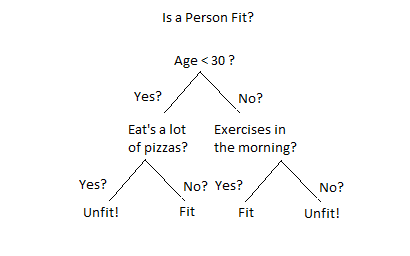
A goofy classification tree.
Say we want to predict income based on captial gains and education level using census data.
# A tibble: 6 × 3
# Groups: income [2]
income educ capital_gain
<fct> <fct> <dbl>
1 <=50K hs 0
2 <=50K advanced 0
3 <=50K college 0
4 >50K hs 7688
5 >50K hs 7688
6 >50K college 5178
We could construct a classification tree by ‘splitting’ based on the values of predictor variables.


To get a sense of the process of tree construction, we’ll do an activity in groups: each group will build a tree ‘by hand’.
first let’s look at the instructions together
then take about 15-20 minutes to do it
A random forest is a classifier based on many trees. It is constructed by:
building some large number of \(T\) trees using bootstrap samples and random subsets of predictors (what you just did, repeated many times)
taking a majority vote across all trees to determine the classification
So let’s take a vote using your trees!
If the number of trees \(T\) is large (as it should be):
trees are built using lots of random subsets of predictors
can keep track of which ones are used most often to define splits
Variable importance scores provide a measure of how influential each predictor is in a random forest.
Back to the proteomics data, the variable importance scores from a random forest provide another means of identifying proteins.
# A tibble: 10 × 1
protein
<chr>
1 DERM
2 IgD
3 MAPK14
4 Notch 1
5 RELT
6 ALCAM
7 ERBB1
8 eIF-4H
9 CK-MB
10 TGF-b R III
But how accurate is the predictor?
| ASD | TD | class.error | |
|---|---|---|---|
| ASD | 53 | 23 | 0.3026316 |
| TD | 19 | 59 | 0.2435897 |
logistic regression
variable selection
a design view of the proteomic analysis

PSTAT197A Fall 2026